

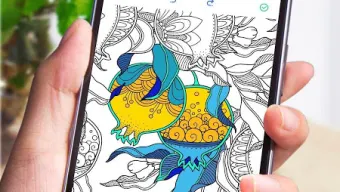
Description
Download Colorfree Coloring Book APK – Free Coloring App, Relaxing Painting Experience, Mind Journey, Stress Relief, Android Tool
Overview
Colorfree: Coloring Book is a multimedia Android application designed to provide a calming and immersive coloring experience. The app invites users into a serene secret garden filled with intricately detailed illustrations, offering a creative outlet for relaxation and mental wellness. By engaging in mindful coloring, users can alleviate stress and cultivate focus through imaginative expression. The software is particularly suited for individuals seeking a digital alternative to traditional coloring books, including hobbyists, students, and adults looking for low-pressure creative activities. While the developer, Colorfree, is identified in the provided information, no additional background about the company or its history is available. Real-world usage scenarios include evening relaxation, mindfulness practice, and casual artistic exploration. The app supports personal color palettes, enabling users to customize their creative process and experiment with unique combinations. It also allows for saving multiple versions of the same sketch, which is useful for tracking progress or comparing artistic choices over time. The developer did not specify additional use cases beyond those described.
Key Features & Capabilities
- Immersive Illustrations – Features a collection of beautifully detailed drawings set in a secret garden theme, providing a visually engaging environment for coloring.
- Personalized Color Palettes – Allows users to create and save custom color combinations for consistent and creative use across multiple projects.
- Intuitive Painting Tools – Enables tap-to-select color and immediate painting, minimizing learning curves and supporting seamless user interaction.
- Advanced Filters and Effects – Offers a range of visual enhancements to transform completed artwork, adding depth and artistic flair.
- Picture Frame Integration – Provides classical picture frames to enhance the presentation of finished pieces, ideal for sharing or displaying digitally.
- Version History & Saving – Supports saving multiple iterations of the same illustration, allowing users to revisit and compare earlier versions.
- Shareable Creations – Facilitates easy sharing of artwork with family and friends, promoting social engagement and creative expression.
These features are designed to enhance the creative journey by combining accessibility with artistic flexibility. For example, users can begin with a base sketch, apply a filter, save the result, and then experiment with a new palette. The ability to save different versions is especially beneficial for those who enjoy refining their work over time. The app’s integration of shareable outputs supports community interaction, even without a built-in social platform. All tools are accessible through a streamlined interface, reducing friction during the coloring process.
User Interface, Workflow & Performance
The user interface appears to be structured around simplicity and visual clarity, prioritizing ease of access to core tools. Navigation is likely based on intuitive gestures such as tapping to select colors and swiping to move between illustrations. Pinch-to-zoom functionality is supported, allowing users to focus on fine details or view the entire artwork at once. The workflow is designed to be fluid, minimizing interruptions between selecting colors, applying paint, and saving progress. While the developer did not specify performance metrics, general Android application behavior suggests stable operation under typical conditions. No reported issues with crashes or freezes were mentioned. The app’s performance is expected to be consistent across devices with standard Android capabilities. Resource usage details such as CPU or RAM consumption were not provided. Stability during extended use is assumed based on the absence of reported issues. The developer did not specify any known limitations in operation or responsiveness.
Compatibility & System Requirements
Colorfree: Coloring Book is designed for Android devices and is distributed as an APK file, indicating it is not available through the Google Play Store. The operating system compatibility is limited to Android, though specific version requirements were not listed. Installation size information is not available, so users should expect variable file sizes depending on the included artwork and assets. The developer did not specify minimum hardware requirements such as RAM, processor speed, or storage space. As such, exact system requirements were not listed. Users are advised to ensure their device supports APK installations and has sufficient storage to accommodate the app and its content. Compatibility information was partially provided, with the OS confirmed as Android and the distribution method as APK.
Pros and Cons
Pros
- Completely free to use with no in-app purchase prompts.
- Offers a wide variety of detailed illustrations for diverse coloring experiences.
- Supports saving multiple versions of the same sketch for creative comparison.
- Includes customizable color palettes and advanced filters for enhanced artwork.
- Intuitive interface with pinch-to-zoom and tap-to-paint functionality.
- Frequent updates with new content, ensuring long-term engagement.
Cons
- Not available on the Google Play Store, requiring manual APK installation.
- No official information on system requirements or device compatibility.
- Limited to Android platform; no support for iOS or desktop operating systems.
- Exact performance details and resource usage were not specified.
- May require additional permissions due to APK distribution, raising security awareness.
FAQ Section
Is Colorfree: Coloring Book available on the Google Play Store?
No, the app is not available on the Google Play Store. It is distributed as an APK file, requiring users to install it manually.
Can I use Colorfree: Coloring Book offline?
Yes, once installed, the app can be used without an internet connection, making it ideal for travel or areas with limited connectivity.
Is the app safe to download and install?
The app is provided by the developer Colorfree, but users should exercise caution when installing APKs from third-party sources. It is recommended to verify the source and scan the file for malware before installation.
How often are updates released?
The developer states that the app receives frequent updates, which include new illustrations and content to keep the experience fresh.
What type of license does Colorfree: Coloring Book have?
The app is free to download and use, with no mention of a paid license or subscription model. It is classified as a free tool with no in-app purchases reported.
Final Thoughts
Colorfree: Coloring Book offers a serene and accessible digital coloring experience tailored for users seeking relaxation and creative expression. Its focus on detailed illustrations, customizable tools, and version control makes it a standout option in the free coloring app space. While the lack of Google Play Store availability and limited system information may pose challenges for some users, the app’s core functionality remains strong and intuitive. The inclusion of filters, frames, and sharing options enhances the artistic value of each creation. For individuals looking for a stress-relief tool, a creative outlet, or a fun activity for all ages, this app delivers on its promise. The frequent updates and free access further increase its appeal. Download Colorfree: Coloring Book now and begin your journey into a world of imagination and calm.
Guides & Tutorials for Colorfree Coloring Book APK
How to install Colorfree Coloring Book APK
- Click the Preview / Download button above.
- Once redirected, accept the terms and click Install.
- Wait for the Colorfree Coloring Book APK download to finish on your device.
How to use Colorfree Coloring Book APK
This software is primarily used for its core features described above. Open the app after installation to explore its capabilities.
User Reviews for Colorfree Coloring Book APK 0
No reviews found





